What is REFramework?
The Robotic Enterprise Framework (REFramework) is one of UiPath’s most powerful and standardized project templates. It is designed to help developers build scalable, robust, and consistent automation solutions, especially for enterprise-level processes.
Think of REFramework as the skeleton or blueprint for building smart, reliable bots.
Why is REFramework Important?
Many automation projects start simple — but as they grow, problems appear:
- How do you handle errors gracefully?
- How do you manage large volumes of transactions?
- How do you retry failures intelligently?
- How do you log and track what the robot is doing?
REFramework solves all of these challenges by giving you a ready-made architecture.
It’s like having an automatic flight control system when you build airplanes.
It helps your bot fly safely and efficiently without crashing midway!
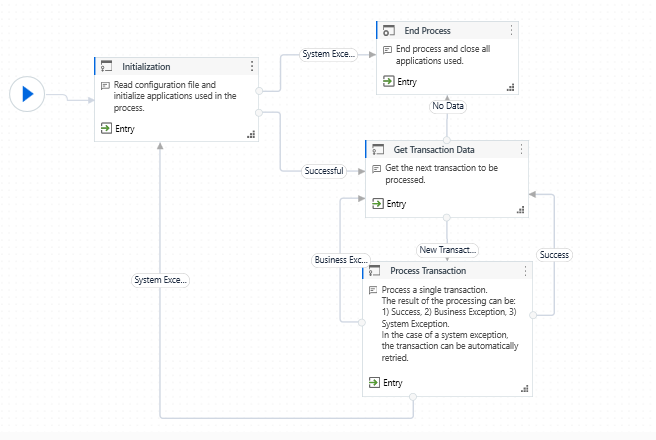
Key Components of REFramework
| Component | Purpose |
|---|---|
| Init | Perform the actual work on the data (like extracting fields and updating systems). |
| Get Transaction Data | Retrieve the next item (like an invoice or email) to process. |
| Process Transaction | Close applications, clean up, and finalize reports. |
| End Process | Close applications, clean up, finalize reports. |
| Exception Handling | In-built mechanisms to retry, log, or safely end on errors. |
| Logging | Centralized logging using UiPath’s Logging Activities for traceability. |
| Retry Mechanism | Automatic retry for failed transactions, avoiding unnecessary bot failures. |
REFramework works perfectly with both Queue-based processes (using Orchestrator Queues) and non-queue processes (like Excel lists, databases).
Simple Example: Processing Customer Orders from Excel
Let’s say you work for a company that gets 100 customer orders every day in an Excel file.
You want to automate the order entry into the company’s web portal.
Using REFramework:
| Step | What Happens |
|---|---|
| Init | Open the company web portal, load the Excel file, and check the internet connection. |
| Get Transaction Data | Read the next customer order (one row at a time) from Excel. |
| Process Transaction | Enter customer details (name, address, order items) into the web portal. |
| End Process | Open the company web portal, load Excel file, check the internet connection. |
| Exception Handling | Close the browser, send a summary email, and log a success report. |
The bot will automatically:
- Retry if the website freezes
- Log success and failures separately
- Keep running efficiently until all 100 orders are done!
Even if the system crashes midway, REFramework ensures the bot picks up where it left off (thanks to Transaction Items).
Benefits of Using REFramework
- Consistency: Standardizes all bots across teams and projects.
- Reliability: Reduces errors, improves transaction success rates.
- Scalability: Easily extend bots to handle more volume without redesign.
- Maintainability: New developers can understand the bot easily.
- Professionalism: Enterprise clients expect bots to follow REFramework structure.
When Should You Use REFramework?
- High volume data processing (e.g., processing 10,000 invoices)
- Complex automation with multiple systems (e.g., SAP + Salesforce)
- Critical processes where error handling is vital (e.g., financial operations)
- Any project where long-term maintainability is important
Stay tuned for more REFramework !!!